Free & open source Chrome extension
A Local Library of the Posts You Saved

Capture stores the links and post details from your saved posts on your own computer, so you can browse and search them. Media links can expire — only the files you explicitly download become durable local copies.

View source on GitHub

Version 4.4.5 · Manifest V3 · no analytics, no remote code. Not currently listed on the Chrome Web Store. Read the source before you trust it.

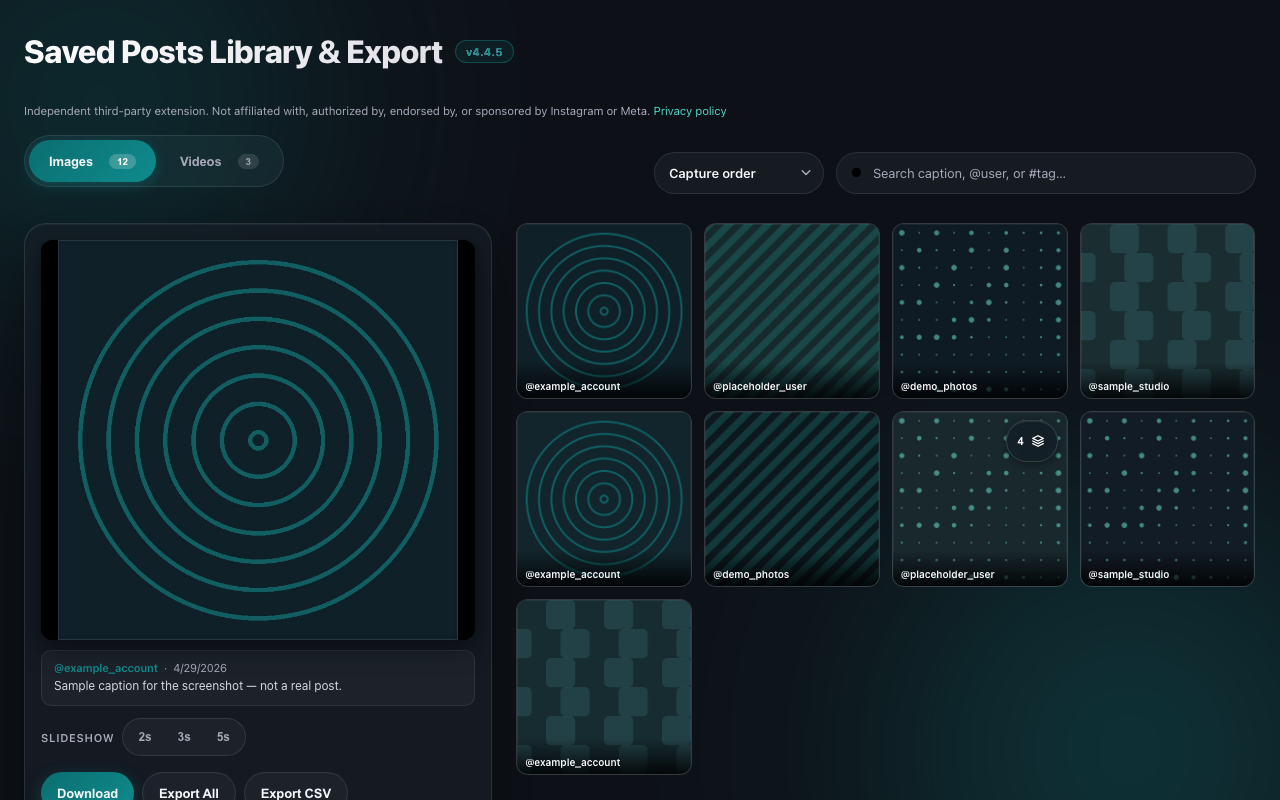
The extension’s Library page: a grid of saved posts with
                  placeholder accounts such as @example_account, a search box for
                  captions, accounts and hashtags, a sort control, Images and
                  Videos tabs, a preview pane with the selected post’s account,
                  date and caption, and Download, Export All and Export CSV
                  buttons.

What It Does

Two steps: capture builds a local library of links and details; download saves the files you choose.

🎠

Carousels & Reels

Album structure is preserved, so slides stay grouped and in order. Instagram usually sends only the cover image for a carousel in the feed — opening the post is what makes the remaining slides available to capture. Yield is not guaranteed.

🔄

Smart Deduplication

The same post seen twice is recorded once. Media links carry expiring signatures, so they are normalised before comparison rather than matched as raw text.

🖼️

Beautiful Gallery View

Browse your saved media in a clean gallery with fullscreen mode and automatic slideshow.

📥

Easy Downloads

Download individual images and videos directly from the gallery. One click to save.

🔒

Stays on your computer

Your library is stored locally. It is not sent to the developer, and there is no analytics. When you view a preview or download a file, your browser fetches that media from Instagram’s CDN.

⚡

Runs only when you start it

Nothing is read until you press Start capture and accept the disclosure. While it runs, the page scrolls for you so a large collection is recorded without clicking through every post. Pressing Stop ends it, and it never resumes on its own — not on a new tab, not after a browser restart.

How it works

Two separate things happen, and the difference matters: capture records links and post details into a local library, and download saves actual media files when you ask for them. Captured links can expire, so only what you download is yours to keep offline.

1

Install the Extension

Load it from source in Chrome — it is not currently listed on the Chrome Web Store.

2

Go to Your Saved Posts

Navigate to your Instagram saved posts page and scroll to load content.

3

Capture & Download

Press Start capture. A disclosure appears the first time, listing exactly what gets recorded; capture begins only after you accept it. Then open the Library to browse, search and download.

Keep a local library of the posts you saved

The source is public so you can read exactly what it does before you trust it.

View Source on GitHub

Independent third-party extension. Not affiliated with, authorized by, endorsed by, or sponsored by Instagram or Meta. “Instagram” is a trademark of Meta Platforms, Inc., used only to describe factually where this extension works.